To label basketball court segmentation masks, settle five things before anyone paints a pixel: a class map with one index per region, which rulebook the court follows, whether lines are their own class, how players and other occluders are handled, and the exact file format. Then measure quality per class, with a boundary-based check for lines, because a one-pixel shift can cost a thin line half its overlap score.
Basketball court segmentation assigns every pixel of a game frame to a court region, such as the floor, the paint or a painted line. The result is a mask, an image the same size as the frame where each pixel holds a class number instead of a colour. Models trained on these masks can find the paint and lines in any frame, which feeds shot location, paint presence counts, defensive zone analysis and court registration.
This guide covers the labeling spec, not the model. For how court registration and player tracking fit together, see our guide to broadcast player tracking, court registration and re-ID.
Key Takeaways
- Rulebooks disagree on which region a line belongs to. FIBA counts restricted-area lines as part of the restricted area but keeps the 3-point line outside the 3-point area (FIBA 2026); the NBA counts lane lines as part of the lane (NBA Rule No. 1). Make lines their own class and record the rule separately.
- Court lines are thin in broadcast video. A 5 cm line is about 3 to 10 pixels wide in a 1920-pixel frame viewed straight on, and thinner on the far side of a broadcast angle.
- By default, mark players, referees and the ball as "ignore" (index 255 is a common convention). Never guess the floor underneath them.
- Deliver masks as single-channel, lossless PNGs at the frame's native resolution. JPEG compression and smooth resizing both create pixel values that are not classes.
- Score regions with IoU and lines with a boundary measure. A 3-pixel line shifted by one pixel scores an IoU of only 0.50.
What classes should a basketball court mask have?
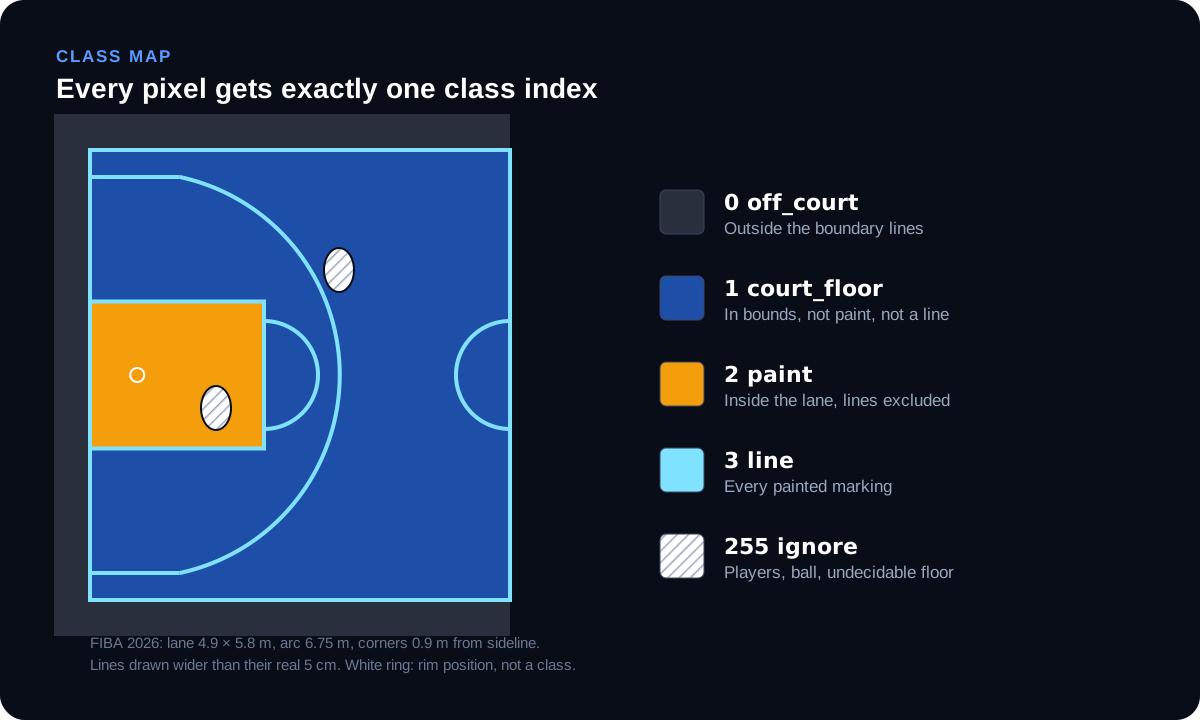
Start with the fewest classes your model needs, and give every class an exact definition. A practical default:
| Index | Class | Definition |
|---|---|---|
| 0 | off_court | Everything outside the boundary lines: apron, benches and the people on them, crowd, advertising boards |
| 1 | court_floor | In-bounds playing surface that is not paint and not a line |
| 2 | paint | Inside of the lane, excluding its painted lines. FIBA calls this the restricted area; the NBA's "restricted area" is the 4 ft arc under the basket |
| 3 | line | Every painted court marking: boundary, lane, free-throw, 3-point, centre and circle lines |
| 255 | ignore | Players, referees, the ball, and floor whose class can't be decided from the frame |
Add classes only when the model uses them. Common additions are a separate 3-point area, the no-charge semi-circle under the basket (the NBA's restricted-area arc), or a class per line type (sideline, lane line, arc) for models that detect court keypoints. Each extra class adds boundaries that annotators must get right, and boundaries are where segmentation errors live.
Why is the 3-point area not a default class? It has no painted fill. It is defined only by a line, so it is easier and more accurate to compute it from court geometry after registration than to have annotators paint it frame by frame.
Which rulebook does the court follow?
The court template must match the league, because the dimensions differ. The figures below come from the rulebooks themselves:
| Feature | FIBA (2026 rules) | NBA (Rule No. 1) |
|---|---|---|
| Court size | 28 × 15 m, measured from the inner edge of the boundary line | Shown on the official court diagram |
| Line width | 5 cm for all lines | 2 in for the free-throw line and restricted-area line |
| Lane / restricted area | Outer edges 2.45 m from the endline mid-point (4.9 m wide); free-throw line's far edge 5.80 m from the endline | Shown on the court diagram; free-throw line 15 ft from the backboard face |
| 3-point line | Arc of 6.75 m radius; corner lines 0.90 m from the sidelines | Arc of 23 ft 9 in from the middle of the basket; corner lines 3 ft from the sidelines |
| Who owns the lines | Boundary lines are not part of the court; restricted-area lines (except the endline) are part of the restricted area; the 3-point line is not part of the 3-point area | Lane boundary lines are part of the lane |
Sources: FIBA Official Basketball Rules 2026, Article 2; NBA Official Rule No. 1. College courts differ again: the NCAA's 2025-26 men's and women's court puts the 3-point arc at 22 ft 1¾ in, per its official court diagram.
Two practical consequences:
- Write the rulebook into the class map. A dataset that mixes NBA, NCAA and FIBA games has three court templates. If the masks or the registration step assume one, the paint and arc will be wrong on the others.
- Older and amateur courts may not match any rulebook. Many gyms carry overlapping markings for several sports or several eras of rules. Decide in writing which set of lines is labeled, and treat the others as floor.
Should court lines be their own class?
Yes. Label lines as their own class, and record line ownership as a rule, not as pixels.
The rulebooks above disagree on whether a line belongs to the region it bounds. Following them literally, annotators would paint NBA lane lines as paint, and FIBA boundary lines as off court. Masks made that way encode a rulebook decision that is hard to undo. A separate line class keeps the pixels neutral. Ownership then becomes a lookup at training or analysis time: in a FIBA game, a player standing on the restricted-area line is in the restricted area.
Lines are also the hardest part of the mask to label, because they are thin. The width of a 5 cm line in a 1920-pixel-wide frame depends on how much court is in view:
| Court visible across the frame | Pixels per metre | 5 cm line width |
|---|---|---|
| 28 m (whole court length) | 68.6 | about 3.4 px |
| 15 m | 128 | about 6.4 px |
| 10 m (tight shot) | 192 | about 9.6 px |
These are our calculations for a camera looking straight at the court. On a real broadcast angle, lines on the far side are foreshortened and get thinner still. So the spec should say how lines are drawn: follow the painted edge in the frame, never a fixed brush width, and never widen a line to make it easier to see.
How do you handle players standing on the court?
By default, mark them as ignore and do not guess what is underneath. Players, referees and the ball sit on top of the floor classes, and a court mask is a map of the floor. The floor under a player's feet is hidden, and inventing it teaches the model to predict paint or lines where it has no evidence.
The convention of a reserved "ignore" value is widely used in segmentation datasets. Cityscapes, for example, maps its void classes to a training ID of 255 and notes that labels with ID 255 might be ignored during training (cityscapesScripts). Most training frameworks let you set an ignore index, so pixels with that value are left out of the loss, and most evaluation scripts skip them too.
The same rule covers:
- Partly hidden lines. Label only the visible part. Don't extend a line under a player because you know where it goes.
- Glare, motion blur and floor logos over lines. If a pixel can't be assigned from the frame, mark it ignore and note it in the frame log.
- Logos and decals inside the paint or on the floor. Label them as the region they sit in, unless the model needs a logo class.
If the model also needs player masks, label them as a separate instance layer. Don't mix them into the court classes.
What file format should court masks use?
One single-channel, lossless PNG per frame, at the frame's native resolution, holding class indices.
- Native resolution means the mask has exactly the same width and height as the source frame. A mask labeled at 1280 × 720 and scaled up to 1920 × 1080 is not a 1080p mask. Its edges are guesses.
- Class indices, not colours. Each pixel holds 0, 1, 2, 3 or 255. Colour masks look nice in a viewer, but every consumer then needs a palette to decode them.
- Lossless and unsmoothed. JPEG compression changes pixel values near edges, and resizing with bilinear or bicubic interpolation blends neighbouring values. Either one creates numbers that are not classes. If masks must be resized, use nearest-neighbour resampling.
- COCO run-length encoding (RLE) is a compact alternative when masks travel inside a JSON annotation file, with one RLE per class per frame. Agree one format and validate every file against it.
A simple automated check catches most format errors before anyone looks at a mask: right width and height, one channel, and only the allowed index values present.
How do you keep masks consistent when the camera moves?
Label frames independently, sampled to cover every camera position. Broadcast cameras pan, tilt and zoom. Consecutive frames are nearly identical, so labeling every frame wastes effort and gives the model thousands of copies of the same view. Sample frames across camera angles, zoom levels, both ends of the court, lighting conditions and venues instead.
There is a second route when a court registration (homography) is available for each frame: render the floor classes from the court template, then have annotators correct the result and mark the occluders. It can be faster on clean footage. The masks are only as good as the registration, though. A small registration error misplaces the rendered lines, often by several pixels and usually most at the far end of the court and the edges of the frame. Review the rendered lines against the painted ones before accepting them.
Frames with no court in view, such as close-ups, replays and graphics, should be skipped or marked entirely ignore, and logged either way.
How do you check the quality of court masks?
Measure regions and lines differently.
For regions (floor, paint, off court), use intersection over union (IoU, also called the Jaccard index) per class. IoU divides the pixels where the label and a reviewed reference agree by the pixels where either marks the class.
For lines, IoU is unstable. A one-pixel shift costs a thin line a large share of its overlap:
| Line width | IoU after a 1-pixel shift |
|---|---|
| 3 px | 0.50 |
| 6 px | 0.71 |
| 10 px | 0.82 |
Our calculation: for a band w pixels wide shifted by one pixel, IoU is (w − 1)/(w + 1). A line that is visually correct can therefore score badly on IoU. Use a boundary measure alongside it. The DAVIS video segmentation benchmark, for example, pairs its region measure (J, the Jaccard index) with a boundary measure (F) computed by matching boundary pixels between the two masks and taking the F measure of precision and recall (Pont-Tuset et al., 2017). For court lines, a simpler version works in both directions: the share of labeled line pixels within a stated tolerance (say, 2 pixels) of the reference line, and the share of reference line pixels within 2 pixels of the label, or their F score. Checking only the first direction would give full marks to a mask that misses half a line.
Sample, then review twice. Pick frames at random across games, venues and camera positions. Have a reviewer correct each sampled mask, have a second reviewer confirm the corrections, and score the original against the corrected version. Report per class, not a single average, because a high floor score can hide a poor line score. Our annotation audit checklist covers sample sizes and error reporting in more detail.
Download the class map template
basketball-court-segmentation-class-map.json is free to copy. It holds the class table above, the mask file format, the FIBA and NBA line-ownership rules, the policies for occluders, hidden lines, glare, logos and camera cuts, and the quality checks. Edit it to your project and get it signed off before labeling starts. A class map changed halfway through a dataset means relabeling everything done before the change.
Court segmentation spec checklist
- Choose the rulebook for each game: FIBA, NBA, NCAA or a documented local court.
- Define the classes, with one sentence per class and an index for each.
- Make lines their own class, and record line ownership by rulebook.
- Reserve an ignore index for players, referees, the ball and undecidable pixels.
- Specify the file: single-channel lossless PNG, native resolution, class indices, one per frame.
- Write the rules for hidden lines, glare, logos, overlapping markings and camera cuts.
- Sample frames across camera angles, zoom levels, court ends and venues.
- Run automated file checks on every mask.
- Score regions with per-class IoU and lines with a boundary or tolerance measure.
- Review a random sample in two passes, and report results per class.
Frequently asked questions
What is the difference between court segmentation and court registration?
Segmentation labels which court region each pixel belongs to. Registration estimates the mapping between the image and a flat court template, usually a homography, so that floor positions can be converted to court coordinates. Segmentation masks and court keypoints are both used as training data for registration models.
Should the paint include the lane lines?
It depends on the rulebook, and that is why a separate line class is safer. The NBA counts lane boundary lines as part of the lane. FIBA counts restricted-area lines, except the endline, as part of the restricted area. With lines as their own class, either rule can be applied after labeling.
What value should ignored pixels have?
Any value outside your class range works if everyone agrees on it, but 255 is a common choice. Cityscapes maps its void classes to training ID 255, and most training frameworks let you set an ignore index so those pixels are left out of the loss.
How many frames do you need to label?
There is no fixed number. Coverage matters more than count: every camera position, zoom level, both ends of the court, every venue and lighting condition in your target footage. Consecutive broadcast frames are nearly identical, so labeling every frame adds little.
Can court masks be generated automatically?
Partly. With a per-frame homography, floor classes can be rendered from a court template, but occluders still need marking and the lines need checking, because registration errors misplace the rendered lines.
Get court masks labeled to your spec
Train Matricx labels basketball court segmentation masks at native resolution, with a class map you approve before work starts and players handled the way your model needs. See the basketball computer vision annotation service, or start with a free pilot on frames from one of your own games.
Court dimensions and line rules were checked against the FIBA 2026 rules, NBA Rule No. 1 and the NCAA court diagram in November 2026. Pixel-width and IoU figures are our calculations. Recommendations are our own. Spot an error? Email info@trainmatricx.com.

Client results

“Train Matricx didn't just provide labeling — they became an extension of our team. With 6K+ football matches annotated and counting at 98% accuracy, they are our premier data partner.”

Billy Brush
Founder & CEO, Dark Horse AI
Don't take our word for it. Test the labels.
Send us the footage your current vendor gets wrong — the occluded players, the motion blur, the edge cases. We annotate it and return a QA report you can check frame by frame.
- Your hardest clip, annotated in 3 business days
- Full QA report with per-frame accuracy
- No commitment, no contract, no card